
C#
Overview
Outputs source code that uses Static Game Data, along with a binary file (basic.bytes) and binary-loading code.
How to Use
Initial Setup
- In the settings file, set
output_formatto C# output. - In the batch or shell scripts, configure the copy destinations for
create_and_copy_data_windows_unity.bat/create_and_copy_data_mac_unity.shandcopy_src_unity.bat/copy_src_unity.shappropriately (setup).
Steps
- Run
create_and_copy_data_windows_unity.batorcreate_and_copy_data_mac_unity.shin the batch or shell scripts. - On the first run, or when YAML files change, run
copy_src_unity.batorcopy_src_unity.sh. - On the C# side (e.g., Unity), use
WienerManager.cs.
Example
- When
basic.bytesis placed in the Resources folder
using UnityEngine;
using Wiener;

public class WienerSample : MonoBehaviour
{
	public WienerManager Master { get; private set; } = new WienerManager();

	void Start()
	{
		var textAsset = Resources.Load("basic") as TextAsset;
		Master.LoadBasicPack(textAsset.bytes);
		foreach (var v in Master.BasicList)
		{
			Debug.Log($"Id:{v.Id} Detail:{v.Detail}");
		}
	}
}
Output
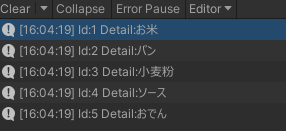
Output Format Based on YAML Header Definition
SourceType
SourceType specifies how to output Static Game Data.
Normal
Output data classes and read data from basic.bytes.
Enum
Output in enum format.
Const
Output constants; data is embedded in source code.
ConstSource
Output constant files; data is embedded in source code.
ContainerType
ContainerType specifies the output data format.
List
Output data in array format.
value[] Name;
Dictionary
Output data in dictionary format.
The first key in Fields becomes the dictionary key.
Dictionary<key, value> Name;
DictionaryList
Output data where the value is an array in dictionary format.
The first key in Fields becomes the dictionary key.
Dictionary<key, value[]> Name;
WienerDictionary
It behaves like a Dictionary and searches data using different methods per platform (Unity: binary search / UE5: TMap).
On Unity, memory usage is comparable to a List (memory-efficient), but search is slower than Dictionary due to binary search.
On UE5, TMap is used because it is required for Blueprint compatibility.
The first key in Fields becomes the dictionary key.
WienerDictionary<key, value> Name;
WienerDictionaryList
It behaves like a DictionaryList and searches data using different methods per platform (Unity: binary search / UE5: TMap).
On Unity, memory usage is comparable to a 2D List (memory-efficient), but search is slower than DictionaryList due to binary search.
On UE5, TMap is used because it is required for Blueprint compatibility.
The first key in Fields becomes the dictionary key.
WienerDictionaryList<key, value> Name;
How to Use the C# Source Code
All loading and data access is performed through the WienerManager class.
Loading Static Game Data
LoadBasicPack
Load basic.bytes.
Specify a file path or binary buffer.
If there is a mismatch between the source and data at conversion time, loading fails.
Result LoadBasicPack(string path);
Result LoadBasicPack(byte[] buffer);
LoadBasicPackFromHash
Debug-only load method.
Load basic.bytes.
Loading is slower than LoadBasicPack.
Specify a file path or binary buffer.
Even if there is a mismatch between source and data at conversion time, loading succeeds.
Data that exists in the binary but not in the source is ignored. Data that exists in the source but not in the binary uses default values, but obfuscated data may become invalid values—be careful.
You can get the list of masters that failed to load from onMissingTargets.
By registering a delegate with WienerManager.SetMissingDelegate, you can detect access to masters that failed to load.
Result LoadBasicPackFromHash(string path, Action<string[]> onMissingTargets);
Result LoadBasicPackFromHash(byte[] buffer, Action<string[]> onMissingTargets);
Accessing Static Game Data
After Static Game Data is loaded, you can access it from each property of WienerManager.
Properties are generated from Header.Name in the Header Definition.
The following sample shows the properties generated in WienerManager when BasicDictionary and BasicDictionaryList are created.
Definition YAML
header:
  ...
  source_type: Normal
  container_type: Dictionary
  name: BasicDictionary
  ...
header:
  ...
  source_type: Normal
  container_type: DictionaryList
  name: BasicDictionaryList
  ...
Generated WienerManager.cs
public partial class WienerManager
{
	...
	public Dictionary<int, BasicDictionaryData> BasicDictionary { get { if (BasicDictionary__ == null) onMissing?.Invoke("BasicDictionary"); return BasicDictionary__; }}
	public Dictionary<int, BasicDictionaryListData[]> BasicDictionaryList { get { if (BasicDictionaryList__ == null) onMissing?.Invoke("BasicDictionaryList"); return BasicDictionaryList__; }}
	...
}
Other
Detecting tampering with obfuscated data
If you register a delegate with the SetFalsifyDelegate method, you can detect memory tampering of obfuscated data.
void SetFalsifyDelegate(Action<string> onFalsify);
Detecting access to mismatched Static Game Data at load time
If you register a delegate with the SetMissingDelegate method, when you load with LoadBasicPackFromHash, you can detect access to Static Game Data that could not be loaded correctly.
void SetMissingDelegate(Action<string> onMissing);
C# Classes
WienerDictionary Class
WienerDictionary<TKey, TValue> is a dictionary-like container that searches data using platform-specific methods: binary search on Unity (memory-efficient) and TMap on UE5 (required for Blueprint compatibility).
Like Dictionary<TKey, TValue>, the indexer throws KeyNotFoundException when the key does not exist. Enumeration returns KeyValuePair<TKey, TValue>.
namespace Wiener
{
	public class WienerDictionary<TKey, TValue> : IEnumerable<KeyValuePair<TKey, TValue>>
		where TKey : IComparable
		where TValue : IWienerDictionaryData<TKey>, new()
	{
		public int Count => values.Length;

		public IEnumerable<TKey> Keys { get; }

		public IEnumerable<TValue> Values { get; }

		public TValue this[TKey key] { get; }

		public WienerDictionary(WienerDataReader reader, WienerString[] stringList, DateTime?[] dateTimeList, bool hash = false);

		public bool ContainsKey(TKey key);

		public bool TryGetValue(TKey key, out TValue value);

		public IEnumerator<KeyValuePair<TKey, TValue>> GetEnumerator();
	}
}
WienerDictionaryList Class
WienerDictionaryList<TKey, TValue> is a dictionary-like container for grouped values. Its behavior is almost the same as Dictionary<TKey, TValue[]>. On Unity, it searches sorted data by binary search and only stores TValue[][] (memory-efficient). On UE5, TMap is used because it is required for Blueprint compatibility.
Like Dictionary<TKey, TValue[]>, the indexer throws KeyNotFoundException when the key does not exist. Enumeration returns KeyValuePair<TKey, TValue[]>.
namespace Wiener
{
	public class WienerDictionaryList<TKey, TValue> : IEnumerable<KeyValuePair<TKey, TValue[]>>
		where TKey : IComparable
		where TValue : IWienerDictionaryData<TKey>, new()
	{
		public int Count => values.Length;

		public IEnumerable<TKey> Keys { get; }

		public IEnumerable<TValue[]> Values { get; }

		public TValue[] this[TKey key] { get; }

		public WienerDictionaryList(WienerDataReader reader, WienerString[] stringList, DateTime?[] dateTimeList, bool hash = false);

		public bool ContainsKey(TKey key);

		public bool TryGetValue(TKey key, out TValue[] value);

		public IEnumerator<KeyValuePair<TKey, TValue[]>> GetEnumerator();
	}
}
WienerManager Class
namespace Wiener
{
	public class WienerManager
	{
		/// <summary>
		/// Loads basic.bytes
		/// </summary>
		/// <param name="path">Specify the path to basic.bytes</param>
		/// <returns></returns>
		public Result LoadBasicPack(string path);

		/// <summary>
		/// Loads basic.bytes
		/// </summary>
		/// <param name="buffer">Specify the binary data of basic.bytes</param>
		/// <returns></returns>
		public Result LoadBasicPack(byte[] buffer);

		/// <summary>
		/// Loads basic.bytes
		///
		/// This method is intended for development
		/// Because of Wiener's fast-loading mechanism, the source and the binary must always be in sync,
		/// but during development the source and binary can become out of sync
		/// When using LoadBasicPackFromHash, it ignores mismatched data and succeeds in loading
		/// onMissingTargets returns a list of masters that were mismatched during loading, so use it for logging, etc.
		/// Also, by registering a delegate with SetMissingDelegate, you can detect access to mismatched masters
		///
		/// </summary>
		/// <param name="path">Specify the path to basic.bytes</param>
		/// <param name="onMissingTargets">Delegate that receives the load-failure list</param>
		/// <returns></returns>
		public Result LoadBasicPackFromHash(string path, Action<string[]> onMissingTargets);

		/// <summary>
		/// Loads basic.bytes
		///
		/// Binary-loading version of LoadBasicPackFromHash
		///
		/// </summary>
		/// <param name="buffer">Specify the binary data of basic.bytes</param>
		/// <param name="onMissingTargets">Delegate that receives the load-failure list</param>
		/// <returns></returns>
		public Result LoadBasicPackFromHash(byte[] buffer, Action<string[]> onMissingTargets);

		/// <summary>
		/// Register detection for tampering with obfuscated data
		///
		/// If you register a delegate with the SetFalsifyDelegate method,
		/// it can detect memory tampering of obfuscated data
		///
		/// </summary>
		/// <param name="onFalsify">Specify the tampering-detection delegate</param>
		public void SetFalsifyDelegate(Action<string> onFalsify);

		/// <summary>
		/// Register detection for accessing unloaded Static Game Data
		///
		/// If you register a delegate with the SetMissingDelegate method,
		/// when you load with LoadBasicPackFromHash, you can detect access to masters that could not be loaded
		///
		/// </summary>
		/// <param name="onMissing">Specify the delegate for detecting access to unloaded Static Game Data</param>
		public void SetMissingDelegate(Action<string> onMissing);
	}
}
Example
Basic/Basic.xlsm#Dictionary
| A | B | C |
|---|---|---|
| Id | Name | |
| 1 | Rice | |
| 2 | Bread | |
| 3 | Pasta |
yaml
header:
  input_path:
  - path: Basic/Basic.xlsm
  sheet: 辞書
  row: 1
  base_type: Normal
  source_type: Normal
  container_type: Dictionary
  output_path: Basic
  name: BasicDictionary
fields:
- key: Id
  name: id
  type: Int
- key: Name
  name: name
  type: String
...
Output C#
Because the source code does not include the Static Game Data values, you need to load basic.bytes.
/// <summary>
/// Automatically generated code
/// </summary>
using System;
using System.IO;
using System.Collections.Generic;

namespace Wiener
{
	public partial class BasicDictionaryData
	{
		public int Id { get; private set; }
		public string Name => stringList[NameStringIndex].Value;
		public uint GroupId { get; private set; }

		WienerString[] stringList;
		uint NameStringIndex;

		public static (Dictionary<int, BasicDictionaryData>, bool) Create(string path, WienerString[] stringList, DateTime?[] dateTimeList)
		{
			var buffer = File.ReadAllBytes(path);
			var reader = new WienerDataReader(buffer);
			return Create(reader, stringList, dateTimeList);
		}

		public static (Dictionary<int, BasicDictionaryData>, bool) Create(WienerDataReader reader, WienerString[] stringList, DateTime?[] dateTimeList)
		{
			reader.GetKeyHashTable(false);
			var length = reader.ReadInt32();
			var value = new Dictionary<int, BasicDictionaryData>(length);
			for (var i = 0; i < length; ++i)
			{
				var key = reader.ReadInt32();
				var val = new BasicDictionaryData();
				val.Load(reader, stringList, dateTimeList);
				value.Add(key, val);
			}
			return (value, false);
		}

		public static (Dictionary<int, BasicDictionaryData>, bool) CreateFromHash(WienerDataReader reader, WienerString[] stringList, DateTime?[] dateTimeList, List<string> errorList)
		{
			var error = !reader.HashSeek(Hash);
			if (error)
			{
				errorList.Add("BasicDictionaryData");
			}
			var hashTable = reader.GetKeyHashTable(true);
			var length = reader.ReadInt32();
			var value = new Dictionary<int, BasicDictionaryData>(length);
			for (var i = 0; i < length; ++i)
			{
				var key = reader.ReadInt32();
				var val = new BasicDictionaryData();
				val.Load(reader, hashTable, stringList, dateTimeList);
				value.Add(key, val);
			}
			return (value, error);
		}

		void Load(WienerDataReader reader, WienerString[] stringList, DateTime?[] dateTimeList)
		{
			this.stringList = stringList;
			Id = reader.ReadInt32();
			NameStringIndex = reader.ReadUInt32();
			GroupId = reader.ReadUInt32();
		}

		private static readonly string Hash = "04ac9e6b16032778741f344174dfc928";

		static readonly Dictionary<string, Action<BasicDictionaryData, WienerDataReader>> HashLoadDict;
		static BasicDictionaryData()
		{
			HashLoadDict = new Dictionary<string, Action<BasicDictionaryData, WienerDataReader>>()
			{
				["462479fdd1ee4f66f2488ac46a489fff"] = LoadId,
				["e3a369b99caa37cd8990e202315e8eff"] = LoadName,
				["f9f3f95ae38a75495795f08f7dfdec99"] = LoadGroupId,
			};
		}
		public void Load(WienerDataReader reader, List<(string hash, byte type)> keyHashTable, WienerString[] stringList, DateTime?[] dateTimeList)
		{
			this.stringList = stringList;
			foreach (var v in keyHashTable)
			{
				if (HashLoadDict.TryGetValue(v.hash, out var action))
				{
					action(this, reader);
				}
				else
				{
					reader.SkipReader(v.type);
				}
			}
		}
		static void LoadId(BasicDictionaryData self, WienerDataReader reader)
		{
			self.Id = reader.ReadInt32();
		}
		static void LoadName(BasicDictionaryData self, WienerDataReader reader)
		{
			self.NameStringIndex = reader.ReadUInt32();
		}
		static void LoadGroupId(BasicDictionaryData self, WienerDataReader reader)
		{
			self.GroupId = reader.ReadUInt32();
		}
	}
}