Excel Operations
Overview
Local Excel input is divided into the following types:
- Data files
- Constant files
- Enum files
Data Files
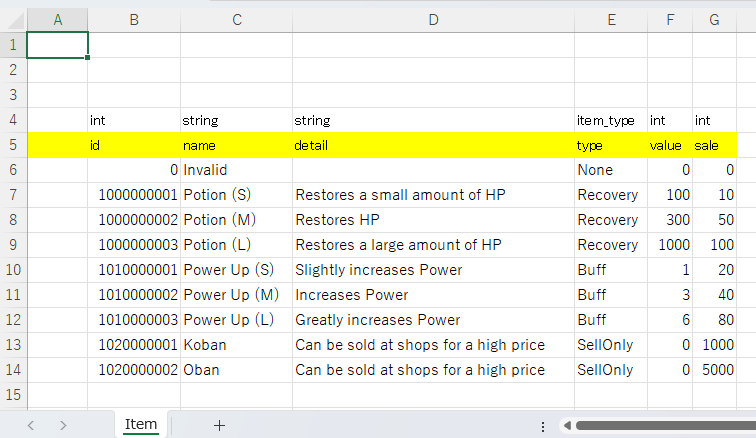
Prepare a data file for each type of Static Game Data you handle.
Data files support array, dictionary, and dictionary-list formats.
Column A in a data file is a special column. Do not enter normal data there.
Rows 1 through 3 are comment rows. You can enter any comments there, but merged cells are not allowed.
In row 4, entering a variable type or enum type is useful when generating YAML from Excel with WienerYamlEditor.
Types specified here are case-insensitive.
Constant Files
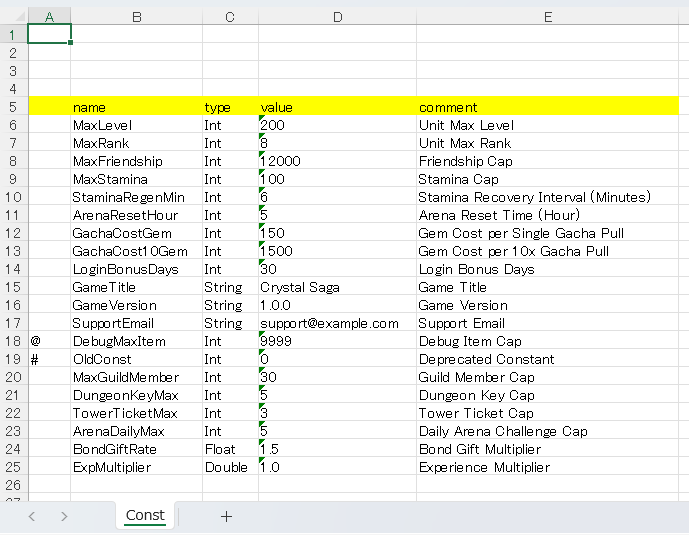
Wiener assumes one constant file per project.
Use the sample Const.xlsx by editing it for your project.
Client-side constants are divided into two types: static data and dynamic data.
You can change the constant format from YAML SourceType.
Static data
Outputs program source, and includes constant values in the source.Dynamic data
Outputs program source and binary data, and the source uses values loaded from the binary.
In column B, enter the variable name in snake_case.
In column C, enter the type. Match the defined spelling and casing exactly.
In column D, enter the value.
In column E, enter a comment.
Enum Files
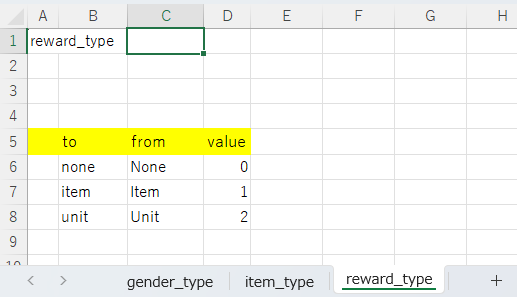
Add enum definitions to EnumBase.xlsx.
Only one enum file is used in a project. Multiple enum files are not supported.
Adding a new enum is done from EnumBase.xlsx.