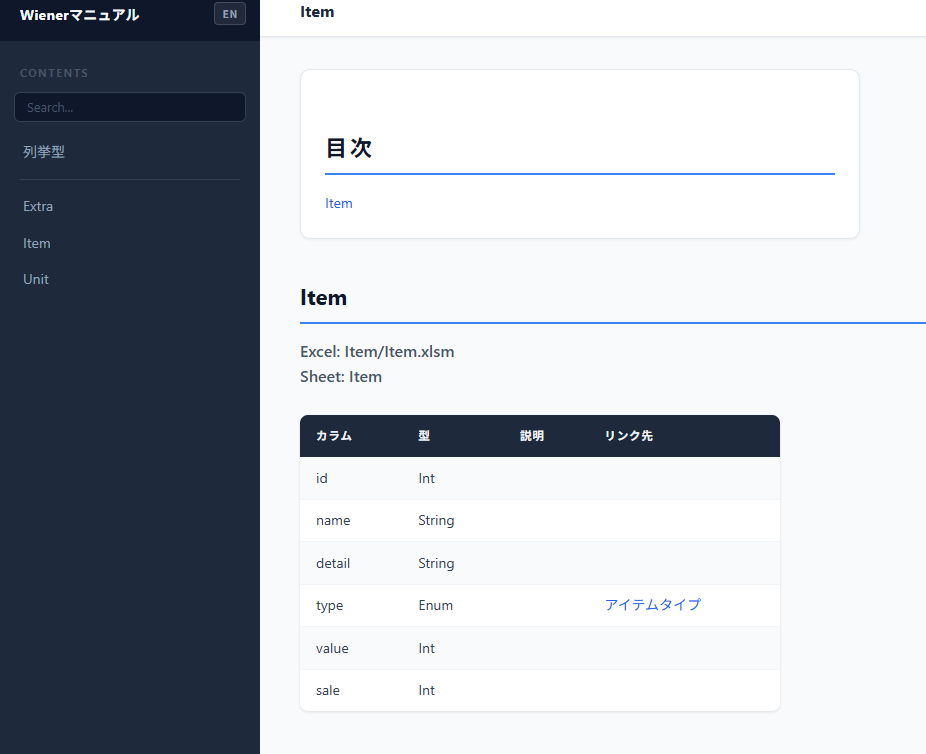
Manual (HTML format)
Overview
Convert the Static Game Data structure list into HTML format.
The output can be used for documentation and other materials.
Output Structure
The output is a two-pane HTML document:
| File | Contents |
|---|---|
index.html | Entry point. Displays menu in left pane and content in right pane via iframes |
menu.html | Navigation links to each data page |
data/enumeration.html | List of all Enum definitions |
data/[SheetName].html | Key definitions for each Excel sheet |
css/base.css | Stylesheet |
Example
yaml
header:
  input_path:
  - path: Item/Item.xlsm
  sheet: Item
  row: 5
  base_type: Normal
  source_type: Normal
  container_type: WienerDictionary
  name: Item
  output_path: Item
fields:
- key: Id
  name: id
  type: Int
- key: Name
  name: name
  type: String
- key: Detail
  name: detail
  type: String
- key: Type
  name: type
  type: Foreignkey
  relation:
    yaml: enum/item_type.yaml
    from: From
    to: To
- key: Value
  name: value
  type: Int
- key: Sale
  name: sale
  type: Int
...
Output