
WienerWiener
  • Introduction
  • Comparison
  • Pricing
  • FAQ
  • Use Cases
  • License
  • Unity Asset vs Standalone
  • Obfuscation & Tamper Detection
  • Mismatch Detection & Debug
  • Localization
  • Versioning
  • Google Sheets Input
  • Excel
  • YAML
  • Settings
  • Data Format
  • Convert
  • ValueOnly Format
  • Startup
  • Samples
  • Converter
  • YAML Editor
  • Setting Editor
  • 日本語
  • English
  • Introduction
  • Comparison
  • Pricing
  • FAQ
  • Use Cases
  • License
  • Unity Asset vs Standalone
  • Obfuscation & Tamper Detection
  • Mismatch Detection & Debug
  • Localization
  • Versioning
  • Google Sheets Input
  • Excel
  • YAML
  • Settings
  • Data Format
  • Convert
  • ValueOnly Format
  • Startup
  • Samples
  • Converter
  • YAML Editor
  • Setting Editor
  • 日本語
  • English
  • Excel

    • Excel Operations
    • Column A in a Data File
    • Add a New Enum

Column A in a Data File

Overview

Column A in a data file is a special column. Do not enter normal data there.

Column A provides the following functions:

  • Disable a row
  • Enable a row only in the development environment

Disable a Row

Entering # disables the row and excludes it from data output.

Enable Only in the Development Environment

Entering @ enables the row only in the development environment. It is excluded from output in the production environment.

If development in the settings file passed to Wiener.exe is set to true, Wiener runs in the development environment, and rows marked with @ are enabled.

Sample

  • Rows 8 and 9 contain #, so those rows are disabled.
  • Rows 11 and 13 contain @, so those rows are enabled only during development.
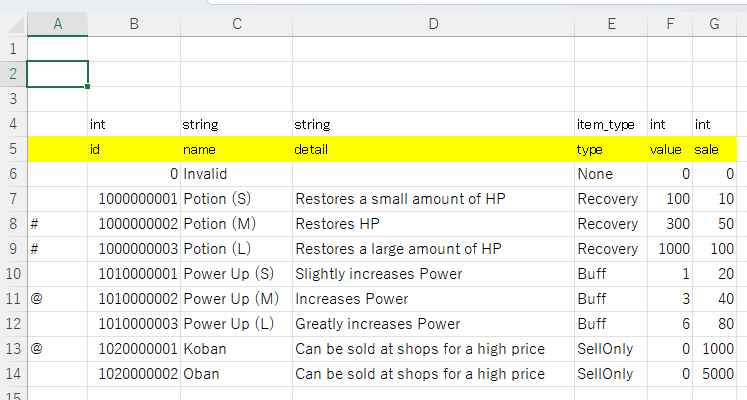
Image from alias

Last Updated:: 6/10/26, 10:12 PM
Contributors: artisan-sawasaka
Prev
Excel Operations
Next
Add a New Enum