既存のYAMLにキーを追加する
サンプル開始前の準備
- Unityスタートアップが完了している
- アイテムマスターを作成するが完了している
- ユニットマスターを作成するが完了している
- 装備マスターを作成するが完了している
概要
このサンプルでは、既存のExcelとYAMLにキーを追加します。
追加したキーをC#コードから参照し、既存の報酬表示コードで説明文とアイコンIDを扱えることを確認します。
追加するキー
- Item: IconId
- Unit: Description, IconId
- Equipment: Description, IconId
手順は次の通りです。
- Excelデータファイルの編集
- YAMLの編集
- コンバート
- 動作確認
Excelデータファイルの編集
既存のExcelに列を追加します。
列名はsnake_caseで入力します。
Item.xlsx
IconIdを一番右に追加します。
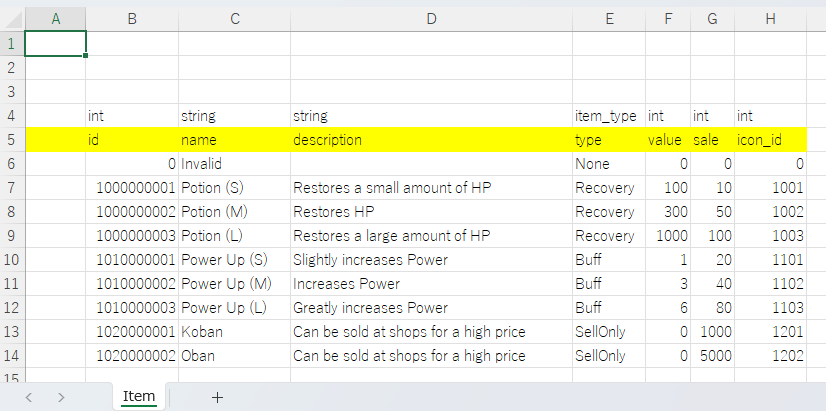
int	string	string	item_type	int	int	int
id	name	description	type	value	sale	icon_id
0	Invalid		None	0	0	0
1000000001	Potion (S)	Restores a small amount of HP	Recovery	100	10	1001
1000000002	Potion (M)	Restores HP	Recovery	300	50	1002
1000000003	Potion (L)	Restores a large amount of HP	Recovery	1000	100	1003
1010000001	Power Up (S)	Slightly increases Power	Buff	1	20	1101
1010000002	Power Up (M)	Increases Power	Buff	3	40	1102
1010000003	Power Up (L)	Greatly increases Power	Buff	6	80	1103
1020000001	Koban	Can be sold at shops for a high price	SellOnly	0	1000	1201
1020000002	Oban	Can be sold at shops for a high price	SellOnly	0	5000	1202
Unit.xlsx
DescriptionをNameの右に追加し、IconIdを一番右に追加します。
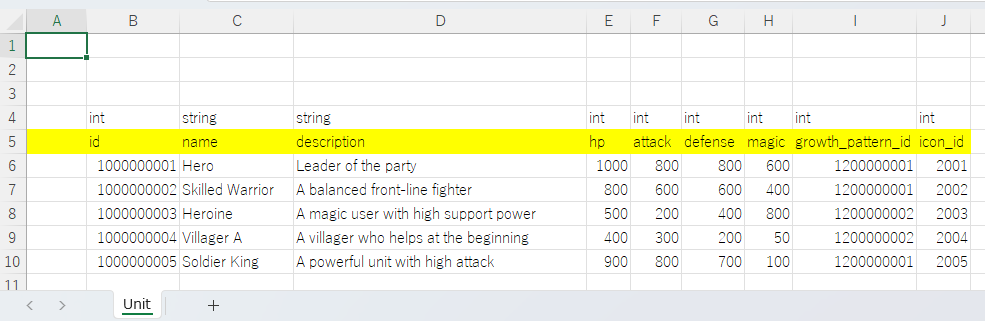
int	string	string	int	int	int	int	int	int
id	name	description	hp	attack	defense	magic	growth_pattern_id	icon_id
1000000001	Hero	Leader of the party	1000	800	800	600	1200000001	2001
1000000002	Skilled Warrior	A balanced front-line fighter	800	600	600	400	1200000001	2002
1000000003	Heroine	A magic user with high support power	500	200	400	800	1200000002	2003
1000000004	Villager A	A villager who helps at the beginning	400	300	200	50	1200000002	2004
1000000005	Soldier King	A powerful unit with high attack	900	800	700	100	1200000001	2005
Equipment.xlsx
DescriptionをNameの右に追加し、IconIdを一番右に追加します。
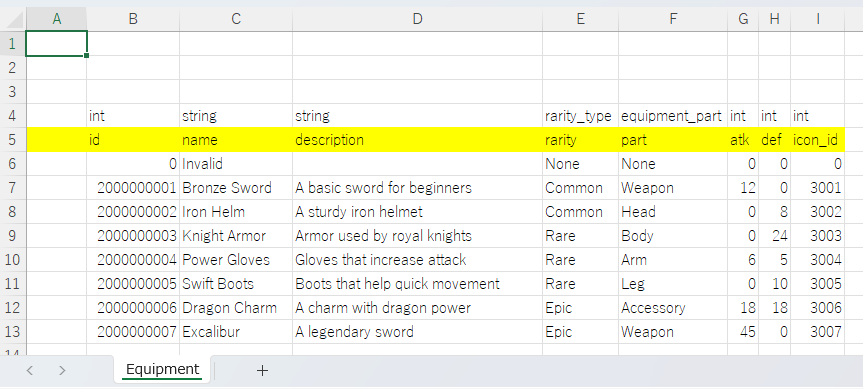
int	string	string	rarity_type	equipment_part	int	int	int
id	name	description	rarity	part	atk	def	icon_id
0	Invalid		None	None	0	0	0
2000000001	Bronze Sword	A basic sword for beginners	Common	Weapon	12	0	3001
2000000002	Iron Helm	A sturdy iron helmet	Common	Head	0	8	3002
2000000003	Knight Armor	Armor used by royal knights	Rare	Body	0	24	3003
2000000004	Power Gloves	Gloves that increase attack	Rare	Arm	6	5	3004
2000000005	Swift Boots	Boots that help quick movement	Rare	Leg	0	10	3005
2000000006	Dragon Charm	A charm with dragon power	Epic	Accessory	18	18	3006
2000000007	Excalibur	A legendary sword	Epic	Weapon	45	0	3007
YAMLの編集
YamlEditorを使用して、既存のYAMLにfieldsを追加します。
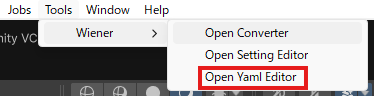
YamlEditorを開く
Tools > Wiener > Open Yaml Editorを選択してYamlEditorを開きます。
item.yamlを編集
item.yamlを開き、Add Fieldボタンを押してfieldsにkeyを追加します
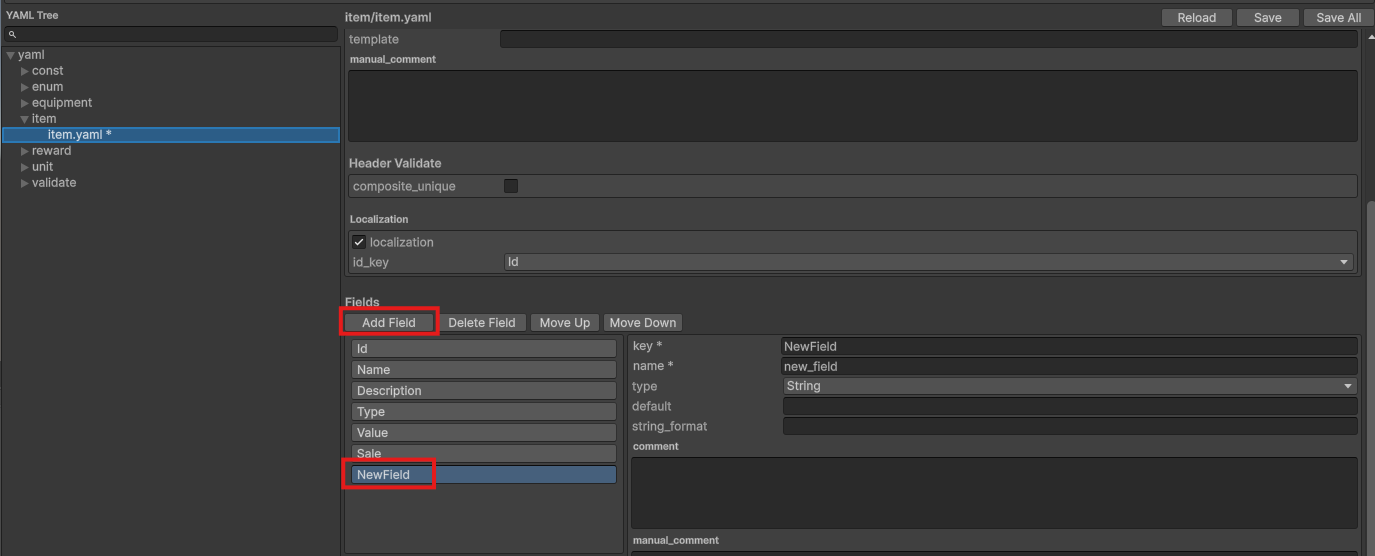
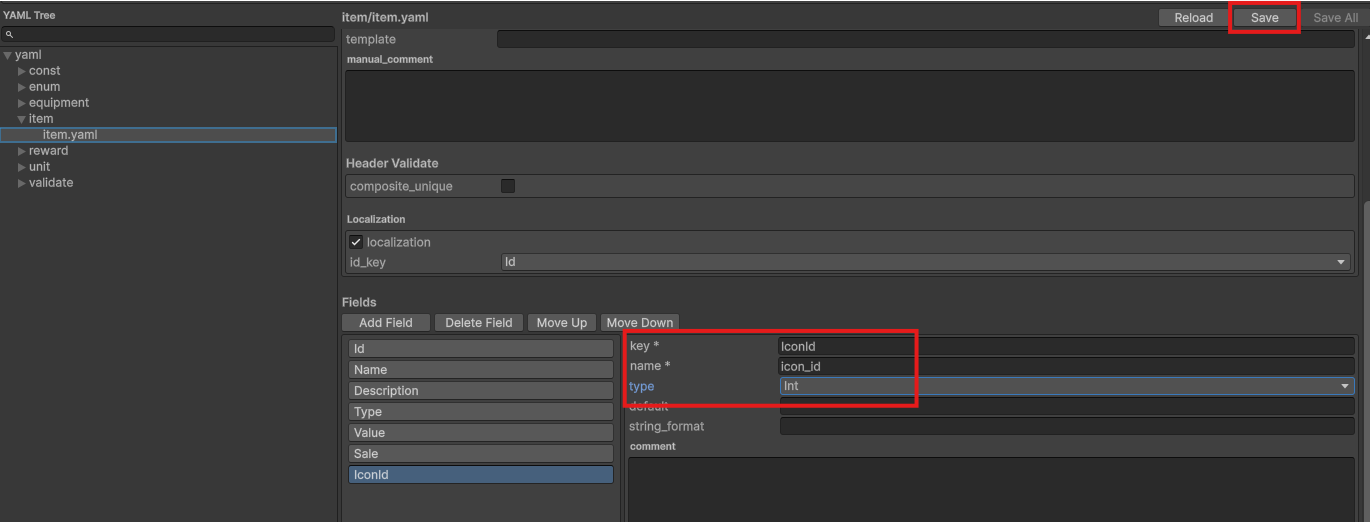
それぞれの項目を以下に変更して、Saveボタンを押下します。
- key: IconId
- name: icon_id
- type: Int
unit.yamlを編集
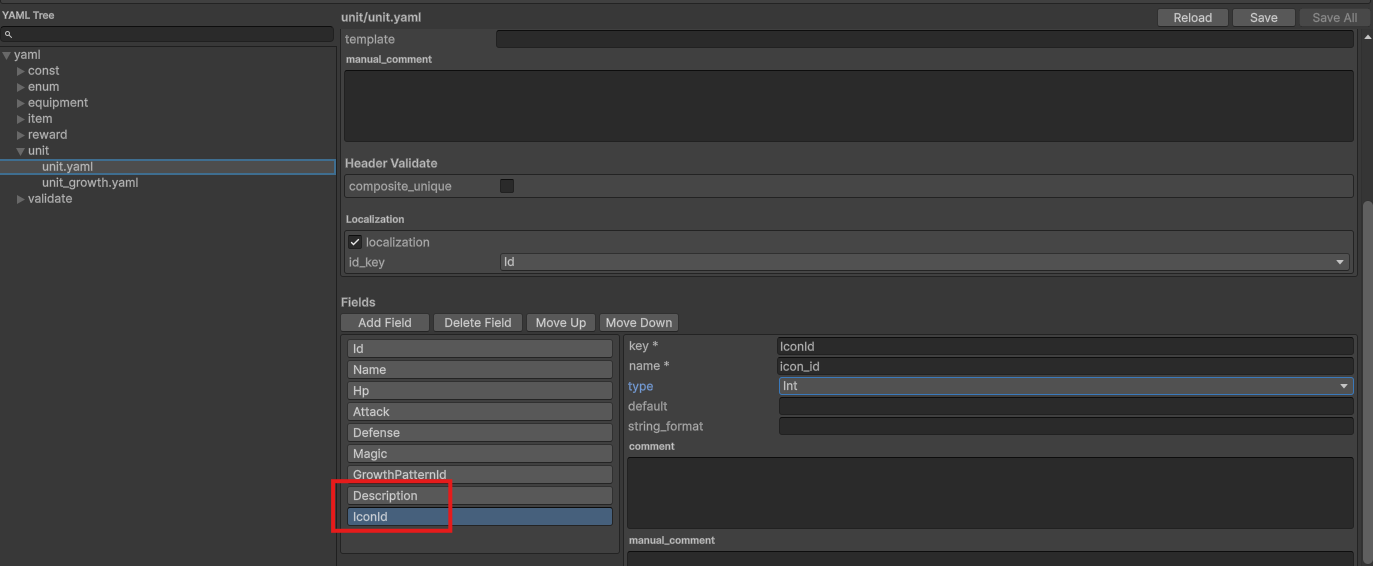
unit.yamlを開き、Add Fieldボタンを2回押してfieldsにkeyを追加します
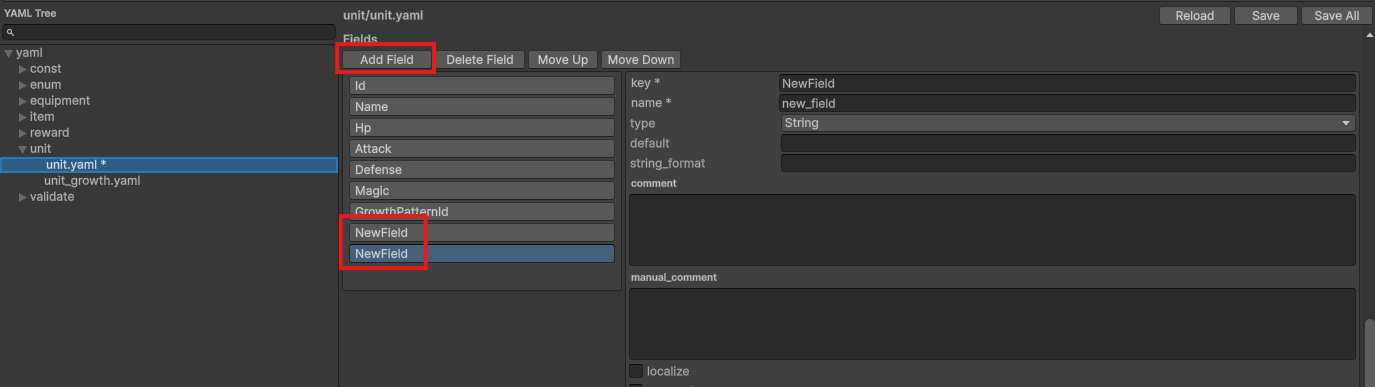
それぞれの項目を以下に変更します
Description
- key: Description
- name: description
- type: String
IconId
- key: IconId
- name: icon_id
- type: Int
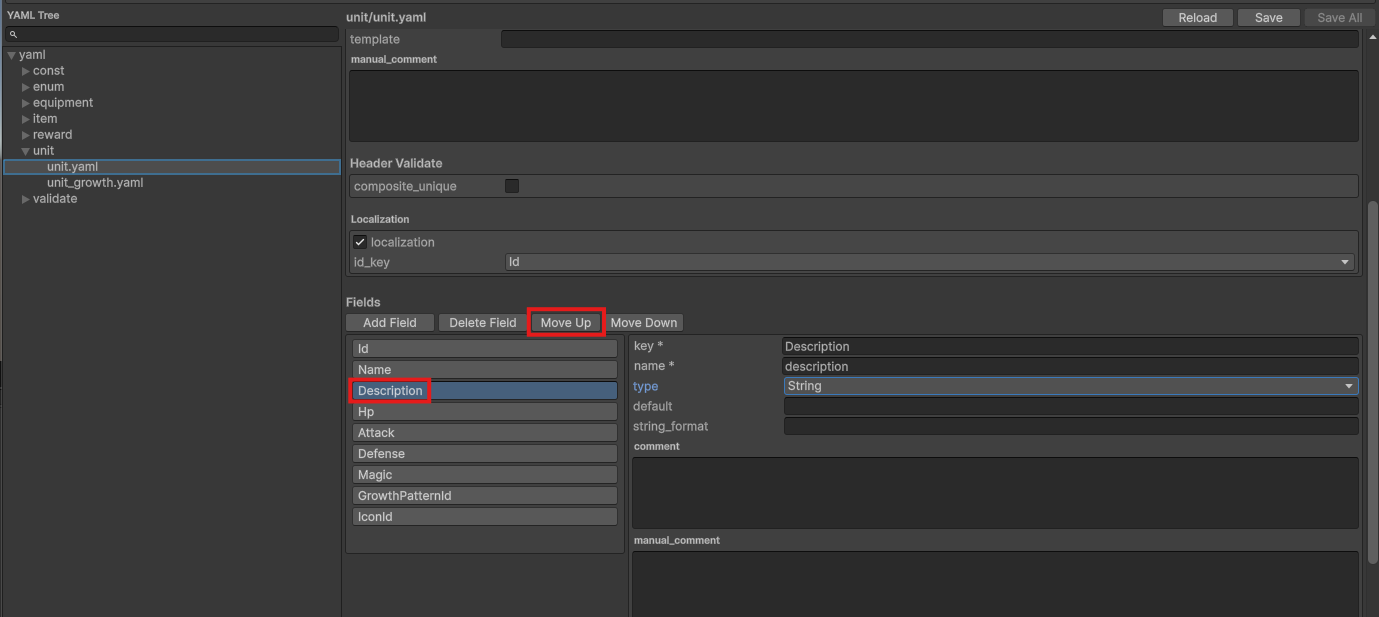
Descriptionを選択状態にしてMove Upボタンを押してNameの下まで移動させて、Saveボタンを押下します
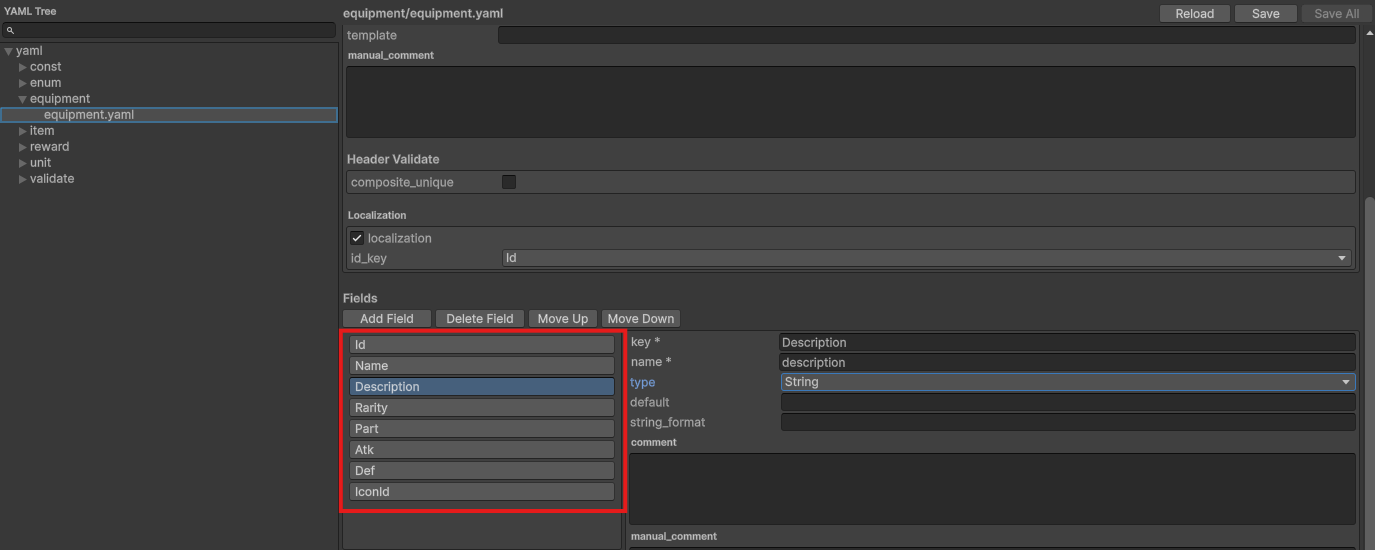
equipment.yamlを編集
unit.yamlと同様の対応を行ってください。
Description
- key: Description
- name: description
- type: String
IconId
- key: IconId
- name: icon_id
- type: Int
コンバート
コンバータを開く
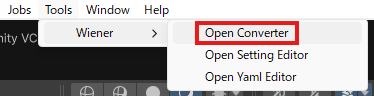
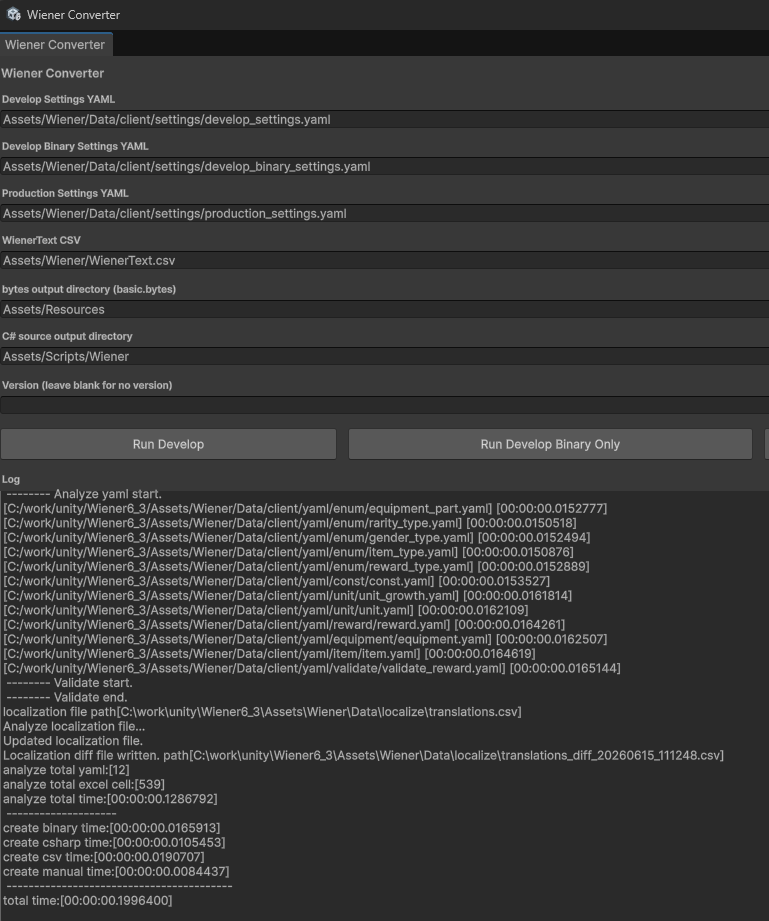
Tools > Wiener > Open Converterを選択してコンバータを開きます。
コンバート実行
Run Developを押下してコンバートを実行し、エラーが出ないことを確認します。
動作確認
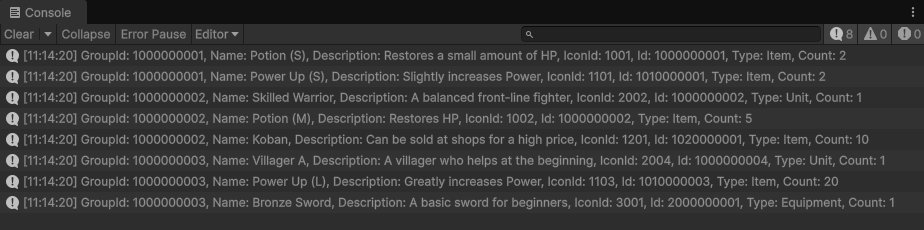
次のReward.cs、Sample.csスクリプトを作成してシーンに配置し、正常にログが出力されることを確認してください。
報酬サンプルのコードをベースにして、説明文とアイコンIDを表示します。
Reward.cs
using Wiener;

namespace Wiener
{
    interface IRewardData
    {
        string Name { get; }
        string Description { get; }
        int IconId { get; }
    }

    public partial class ItemData : IRewardData {}
    public partial class UnitData : IRewardData {}
    public partial class EquipmentData : IRewardData {}
}

public class Reward
{
    public int Id { get; private set; }
    public RewardType Type { get; private set; }
    public int Count { get; private set; }
    public string Name => _rewardData?.Name ?? "";
    public string Description => _rewardData?.Description ?? "";
    public int IconId => _rewardData?.IconId ?? 0;

    private IRewardData _rewardData;

    public Reward(WienerManager wienerManager, int id, RewardType type, int count = 1)
    {
        Id = id;
        Type = type;
        Count = count;
        _rewardData = type switch
        {
            RewardType.Item => wienerManager.Item.TryGetValue(id, out var item) ? item : null,
            RewardType.Unit => wienerManager.Unit.TryGetValue(id, out var unit) ? unit : null,
            RewardType.Equipment => wienerManager.Equipment.TryGetValue(id, out var equipment) ? equipment : null,
            _ => null
        };
    }
}
Sample.cs
using UnityEngine;
using Wiener;
using WienerLib;

public class Sample : MonoBehaviour
{
    void Start()
    {
        var wm = new WienerManager();
        var textAsset = Resources.Load("basic") as TextAsset;
        var result = wm.LoadBasicPack(textAsset.bytes);
        if (result != Result.Success)
        {
            Debug.LogError($"Failed to load basic pack: {result}");
            return;
        }

        OutputReward(wm);
    }

    void OutputReward(WienerManager wm)
    {
        foreach (var rewards in wm.Reward.Values)
        {
            foreach (var reward in rewards)
            {
                var r = new Reward(wm, reward.RewardId, reward.RewardType, reward.RewardCount);
                Debug.Log($"GroupId: {reward.GroupId}, Name: {r.Name}, Description: {r.Description}, IconId: {r.IconId}, Id: {r.Id}, Type: {r.Type}, Count: {r.Count}");
            }
        }
    }
}
実行結果